
BLOG DIRECTORIES


Friday, 25 February 2011


Thursday, 24 February 2011
Dell XPS 17

Tecky News : (Latest Tecknology Dell Xps 17 Laptop Has Been Introduced By Dell Company)
Dell XPS 17 always seems to happen when a new CPU generation launches. Toss a capable GPU and 3D stereoscopic capability into the new model, and you have a feature-rich desktop replacement.
The XPS 17 3D reviewed here ships with an Intel Core i7 2820QM clocking in at 2.30GHz but capable of pushing to a full 3.4GHz in Turbo Boost mode. This is one of Intel's latest quad-core processors built on the new Sandy Bridge architecture's 32nm manufacturing process. It's a major improvement over past Intel quad-core mobile CPUs, offering faster clocks, more robust power management, and overall better performance.
The display provides the 120Hz refresh rate and IR emitter necessary for stereoscopic 3D. We used it with an aftermarket set of Nvidia's 3DVision glasses, and everything works quite well. Driving the display is an Nvidia GeForce GT 555M mobile GPU. Dell has beefed up the resolution of the display to true 1080p.
Most of the other features are comparable to those of the earlier XPS 17, including dual hard drives, four USB ports (the two on the rear are USB 3.0 capable), 802.11n, a Blu-ray drive, and both HDMI and mini-DisplayPort digital video output connectors.
Our test system's performance in standard desktop apps was stellar, producing one of the highest scores we've seen from a laptop on WorldBench 6, an impressive mark of 151. The new Intel CPU, coupled with a staggering 16GB of main memory, were no doubt major factors. You'll pay for this power, however: The XPS 17 3D starts at $1450, and the configuration we reviewed will run you $2389 (prices as of February 2, 2011).
The Nvidia GT 555M is newer than the 445M that Dell used in the last-generation XPS 17 L701X. Since the screen is now true 1080p, however, the 555M needs to drive 44 percent more pixels than the older laptop's 1600 by 900 display had. That means lower frame rates in games, so you may want to dial down the resolution a bit if you're playing current-generation titles. The performance of the GT 555M seems only slightly better, as in 3D Mark 2011 this laptop garnered a score of 1307 versus the mark of 1286 from the older XPS 17.
At 1080p, the XPS 17 3D ran Far Cry 2 at 49.93 frames per second, while in the racing title F1 2010 it managed just 18 fps in DirectX11 mode. In Just Cause 2, a graphics-intensive DX10 title, it eked out 18 fps as well. On the other hand, in Metro 2033 it reached 25 fps, only a little slower than the older XPS 17, which was running at a lower resolution. We disabled antialiasing in all game tests.
The change in screen resolution also means that stereoscopic 3D gaming, while theoretically capable, will be performance limited. If you want to take advantage of 3DVision for games, you'll need to reduce the resolution considerably, possibly as low as 1280 by 720.
Playing 3D Blu-ray movies, though, works very well aside from the substantial reduction in brightness and contrast. The effect is particularly startling in the IMAX 3D Blu-ray title Deep Sea 3D. We also viewed standard Blu-ray high-def movies, and those looked great. In all cases, you really want to sit in the sweet spot, as the color shift and brightness drop-off are both very noticeable as viewing angles change.
Audio quality seems quite good, with acceptable speaker distortion and with the overall tonal quality tending toward neutral. Bass is limited, as you'd expect. The volume level during music playback didn't seem particularly loud, but audio during games could get quite ear-piercing.
The keyboard seems to be a slight step backward. The keys offer a gentle sculpting, making it easy to settle fingertips into them, but the surface seems slippery--it's too easy for fingers to slide to another key and mistype while touch typing. The arrow keys and PageDn/Ins cluster keys are way too small, as well.
Overall, the Dell XPS 17 3D offers superb performance in standard desktop apps. Gaming performance is pretty good, too, though you'll want to scale back the resolution a bit and dial down the graphics features for best results, particularly in newer games. The new display looks very good, and stereoscopic Blu-ray movies are spectacular, if you're into them. Performance on stereoscopic 3D games is still too limited, however.
Weighing 9 pounds, 11 ounces with the power brick, and measuring nearly 2 inches thick in places, this is no HP Envy 17. Still, if you're looking for a capable, premium desktop replacement that can do everything, the Dell XPS 17 3D fits the bill.
Share & Enjoy
Tuesday, 22 February 2011
Mac Book Pro
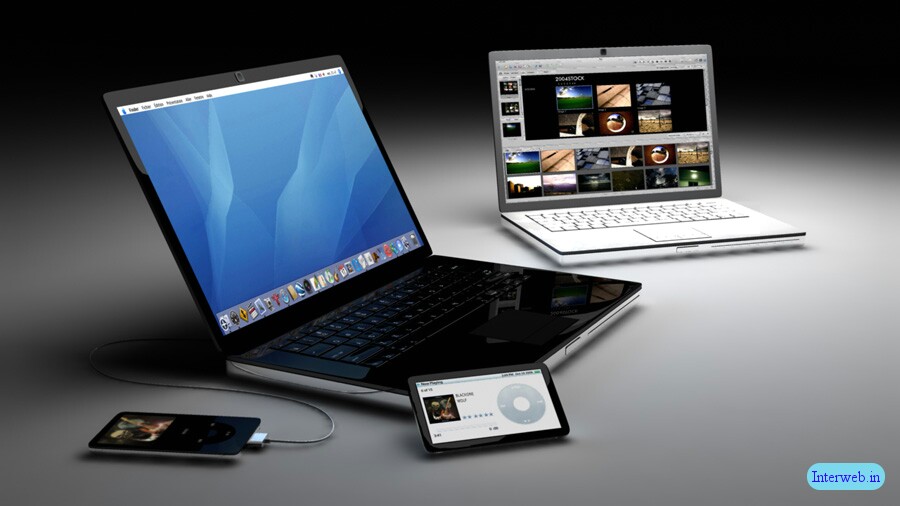
Tecky News : (Apple Mac Book Pro Latest Tecknology Laptop Has Been Launched By Apple Company)
Apple has told them that the new MacBook Pro latops will be available for sale within the next two weeks. It looks like Apple stores should start to receive shipments within the next few days. They also talked about some interesting new features, though you will have to be the judge as to how likely they are.
First, we hear that the new MB Pro’s will have glass trackpad that are larger than the ones found in current models. The next piece of info had BGR questioning it and we feel the same way but who knows. It appears as if the OS on the new laptops will be loaded on to an internal 8-16GB SSD with everything else remaining on a regular hard drive. This seems overly complex, but it could be Apple’s way of not compromising on OS performance by using the SSD’s but keeping cost down by only having to use smaller ones. The standard hard drives are of course much cheaper and for everything else should be more than comparable. For those of you that just have to have the best of the best though, there will be options for SSD only MacBook Pros, but the SSD/Standard HD combo will be the basic configuration. The last bit of information relates to the weight of the new models which will reportedly come in about a 1/2 pound lighter on average than the previous models and be sold in 5 SKUs which confirms information previously reported.
Features :
The Macbook Pro has a screen size of 15.4-inches and offers a high resolution of 1440 x 900 pixels; which is an aspect ratio of 16:10. Frankly, Apple has got the ratio between resolution and screen size just right; the MB Pro feels just right; the desktop area is large and the icons not to small as it happens with smallsized, large resolution screens. The screen on the MB Pro is in a league of its own; it's bright, crisp and the colours are very vivid. Level of black is very good; and this display will handle images and videos excellently.Any sort of multimedia usage is fun experience. The Macbook also has a good display; better than nearly all notebooks in the range. However, its miles apart from the MB Pros screen. In comparison the blackness level isn't as good; and colours seem a touch washed out; irrespective of how much you play with the display settings. The contrast ratio is good; but not in comparison to the MB Pro. Another issue with the MB's screen is the poor viewing angles; although better than most 13.3-inch notebooks it's not even close to the MB Pro. For a 13.3-inch screen the resolu¬tion of 1280 x 800 pixels seems a little less; however this is standard, so we won't complain. If only we didn't have 15.4-inches of gorgeousness sitting next to the MB when we tested its display! Both displays are LED-lit; so they're power savers too. The multitouch touchpad is something Apple is advertising aggressively and it's simply a trackpad with integrated mouse button functionality; so both Macbooks have no mouse buttons. You simply click anywhere on the trackpad. While this may take a couple of days to get used to; it is extremely functional and actually faster than left and right clicking. Finger gestures also work, as on the iPod Touch; although this does take a little bit of getting used to as initially you won't know exactly what to do with the fea¬ture. Once you get a little practice it's superb. The large surface area of the trackpad also helps. lets buy it .....
Share & Enjoy
Share & Enjoy
Optimize Windows Speed Using Windows Registry editor & Get rid of Unwanted Programs On Startup
Hey do you know.....How to optimize the Windows performance by removing unwanted programs from startup using windows registry. Applicable to Windows XP, Vista, Windows 2000, windows 98 and windows server.
I will start hacking tips with a very useful and easy to do job. Most of us face this problem of computer slowing down; windows operating system takes ages to load when started, windows explorer hangs up and also how to find out whether your computer is infected.
Follow this steps:
- Start and click on run in case of windows XP, Server, windows 98, and 2000 but in vista type directly in search box


2. Type Regedit in the run box to open registry editor
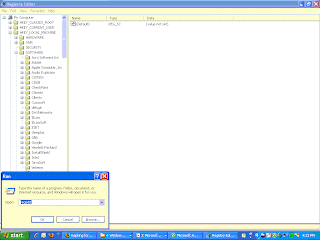

Find out the current programs which are starting up with windows

4. Right click on any program to delete the entry, which you don’t want to be loaded during startup; personally I would only keep anti virus program entries.


3. Go to file menu and click on export to create a back up of registry, save it on your drive other than your default windows directory.

Find out the current programs which are starting up with windows
After opening Registry editor click on HKEY_LOCAL_MACHINE
Software\
Microsoft\
Windows\
Current Version\
Run
You will see something like this on right hand pane in your registry editor

Now it’s time to get rid of the hard disk. programs those slow down your operating system and possible may be a Trojan horse hiding in your system
4. Right click on any program to delete the entry, which you don’t want to be loaded during startup; personally I would only keep anti virus program entries.

Now you can repeat the same process with HKEY_LOCAL_USER entries and keep only Cftmon.exe for your computer sound to be working

After deleting the unwanted program registry entries, restart the system and feel the difference in speed. If you are confused about which entries to be deleted from registry editor or want to know whether it’s a Trojan or useful program
Try it & Enjoy
The Hewlett–Packard Tablet

Tecky News : Hp( Hewlett–Packard ) Launched Latest Tecknology Phone Called Hp Tablet by Hp Company
The HP TouchPad looks remarkably similar to the Apple iPad, which is no wonder considering it has nearly the same dimensions, with a similar 9.7-inch (1024 x 768 )resolution display and a form factor that is almost a mirror image. It does, of course, have some minor differences, such a touch sensitive home button below the display and a 1.3 megapixel front facing camera on top for video calling.
Underneath the TouchPad is a much more impressive machine than the iPad. It runs on a dual core Qualcomm Snapdragon APQ8060 processor, clocked at 1.2GHz. It also has built-in gyroscope, accelerometer and a compass, 3G connectivity, A-GPS, Bluetooth, Wi-Fi 802.11 b/g/n and stereo speakers with Beats Audio.
The TouchPad runs a newer version of webOS, v3.0. Visually, it looks quite similar to the previous one, which is not bad. The OS still looks excellent with the level of multitasking that is the best across all the mobile platforms out there right now. Even the notification system has been done very well and Apple could learn a thing or two from it. Also, from what we have seen in the videos, the device seems to run very smooth, thanks to a combination of powerful hardware and well optimized software.
We are really looking forward to see the TouchPad in India. Palm was unwise enough to never launch its webOS devices outside of a few countries and we all saw what happened to them and we hope HP would be smart enough to be more generous in selecting countries.
Underneath the TouchPad is a much more impressive machine than the iPad. It runs on a dual core Qualcomm Snapdragon APQ8060 processor, clocked at 1.2GHz. It also has built-in gyroscope, accelerometer and a compass, 3G connectivity, A-GPS, Bluetooth, Wi-Fi 802.11 b/g/n and stereo speakers with Beats Audio.
The TouchPad runs a newer version of webOS, v3.0. Visually, it looks quite similar to the previous one, which is not bad. The OS still looks excellent with the level of multitasking that is the best across all the mobile platforms out there right now. Even the notification system has been done very well and Apple could learn a thing or two from it. Also, from what we have seen in the videos, the device seems to run very smooth, thanks to a combination of powerful hardware and well optimized software.
We are really looking forward to see the TouchPad in India. Palm was unwise enough to never launch its webOS devices outside of a few countries and we all saw what happened to them and we hope HP would be smart enough to be more generous in selecting countries.
Share & Enjoy
Subscribe to:
Posts (Atom)